
Beauty salon
Online booking system for beauticians
Facials, lashes, brows, waxing. If you cannot answer the phone during a treatment, clients can still book their next appointment.
- Start: HUF 0, no time limit
- No booking commission
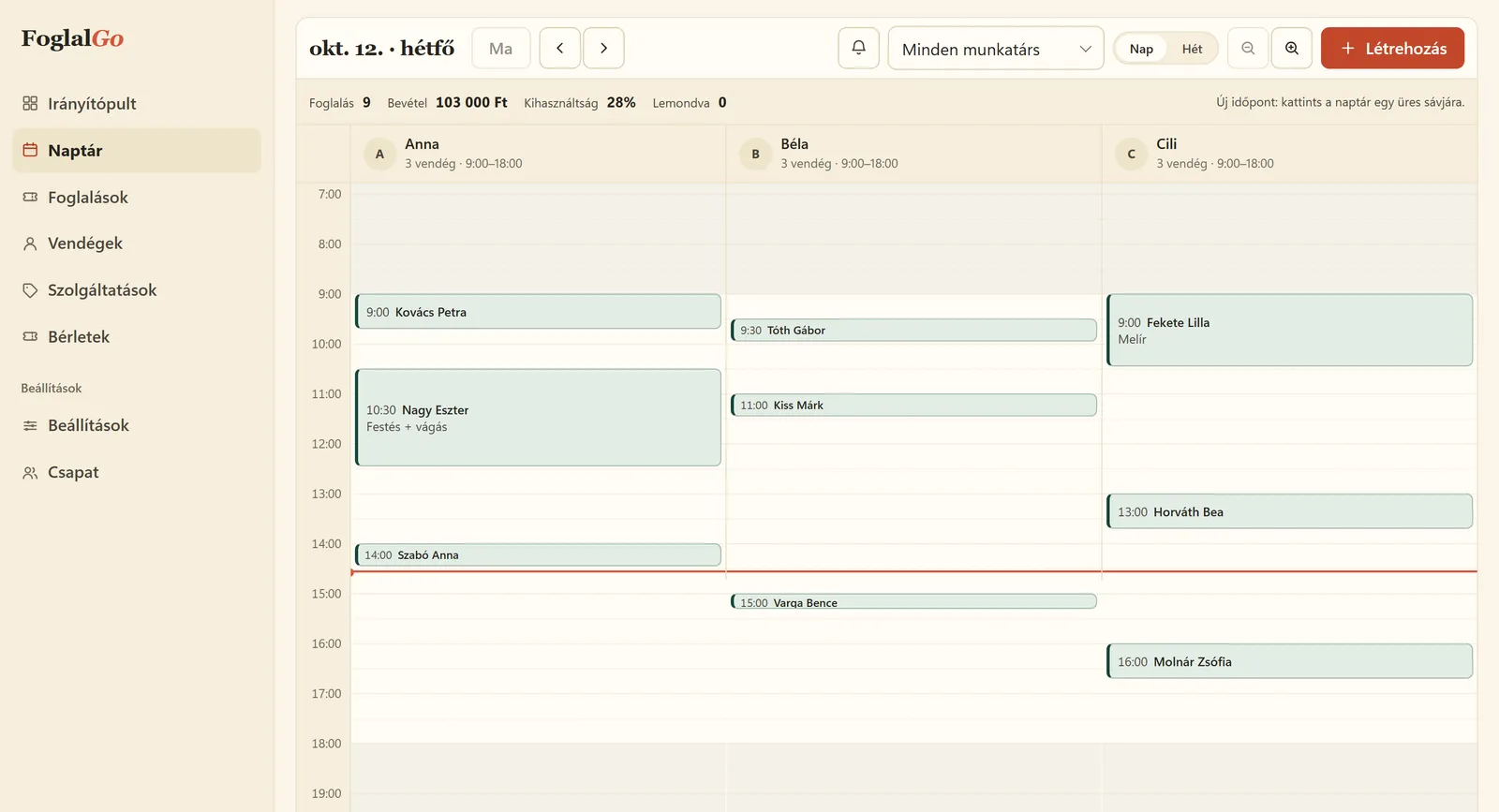
Beauty salon: what FoglalGo takes care of
No phone calls during treatments
Clients can book on your link at any time of day, and after the treatment you see the new appointment in the dashboard.
Client profile
For every client you see their previous treatments and can add notes, for example about skin type or sensitivity.
Breaks between treatments
You can leave separate time for preparation and cleaning for each service.
What your service list could look like
An example setup. You set the names, durations and prices yourself; at registration the system adds a starter list that fits your trade.
The pricing page shows which plan your list fits into. If you use another system now, our comparison pages compare the fees with dates and sources.
| Service | Duration / note |
|---|---|
| Classic facial | 60 min |
| Lash lift | 60 min |
| Brow shaping | 20 min |
| Waxing, legs | 40 min |
| Deep-cleansing treatment | 75 min |
How does online booking work in a beauty salon?
The beautician adds the treatments with their real lengths: a classic facial takes an hour, brow shaping twenty minutes, a deep-cleansing treatment seventy-five minutes. If preparation or cleaning is needed between treatments, it is set as a separate break for each service. On the booking link the client chooses the treatment and a free time, and immediately gets an email with the details and a cancellation link.
This matters for a beautician because they cannot answer the phone during a treatment. Clients can book in the evening or at the weekend too, and the beautician sees the new appointment in the dashboard calendar after the treatment. Appointments arranged by phone go into the same calendar, so the online offer always shows only the times that are actually free.
What should go on the client profile, and what about data protection?
On the client profile you see the client’s past and upcoming bookings and can add notes. In a beauty salon this is useful for recording skin type, a product used before or a treatment preference, so you do not have to ask everything again next time.
However, health information, such as an allergy or a skin condition, counts as special category data under the GDPR. Only record it if it is really needed for the treatment and the client knows about it. Your business is the controller of client data, and FoglalGo acts as a processor; the responsibilities are set out in the data processing agreement. The active booking database is bound to an EU data location, and your bookings and client list can be downloaded as CSV.
Which plan does a beautician need?
For a beautician working alone who is just introducing online booking, the Start plan may be enough: HUF 0, with no time limit, 1 team member, 3 services and 30 bookings a month. If your treatment list is longer, for example with several variants of facials, lash lifts, brows and waxing listed separately, you will need the Pro plan.
The Pro plan costs HUF 3,990 a month or HUF 39,900 a year. It gives you unlimited services and bookings with up to 3 team members, sends the client a reminder email before the appointment, and unlocks the full set of booking rules. For a larger salon, the Business plan costs HUF 5,990 a month, with unlimited team members. None of the plans charges a commission, and there is no VAT on the fees.
How do you handle treatment courses with several sessions?
A course of facials or machine treatments often repeats weekly, on the same day at the same time. You do not have to add it session by session: in the dashboard a booking can repeat weekly for 2–12 weeks, so every session of the course goes into the calendar in one step, and those slots can no longer be booked online.
If the client wants to move one session, you change that particular booking. You follow the progress of the course and the skin’s reactions on the client profile, as notes. So before the next session you see at a glance where the client is and what you agreed last time.
Last updated:
Getting started in three steps
Sign up
Enter the name of your business and choose your trade.
Set it up
Opening hours, services, team members or resources, cancellation deadline, and finally you approve your data controller details.
Share it
A link, a QR code or an embedded widget on your website.
Questions from beauticians
Can I ask clients for a phone number?
Yes, you can make it mandatory in the settings. By default a name and an email address are enough.
Where is client data stored?
The active booking database is bound to an EU data location. Your business is the controller of client data, and FoglalGo acts as a processor. The details are set out in the data processing agreement.
Does it work with a single treatment room?
Yes. If you work alone, the Start plan with 1 team member and 3 services costs HUF 0.
Can I ask for a deposit for longer treatments?
Online card payment is not available at the moment; it is marked “coming soon” in the Fee Schedule. You can ask for a deposit outside the booking.
Can a client book several treatments at once?
Yes. A client can choose several services in one booking, and the system adds up the duration and the price.
Further reading
Starting a beauty business in Hungary in 2026: the steps in order
Qualifications, registration, tax, a treatment room and handling client data for a new beautician.
Read it →How to choose a booking system: eight criteria
Eight questions worth asking before you give your clients the booking link.
Read it →Other industries
Launch your booking page
Start plan: HUF 0, no time limit. Sign up without a bank card; after five questions your booking link is ready.