
Hair salon
Online booking system for hair salons
Cuts, colouring, highlights: every service with its own duration. Clients choose who they want to go to and when, and you see in the calendar who works when.
- Start: HUF 0, no time limit
- No booking commission
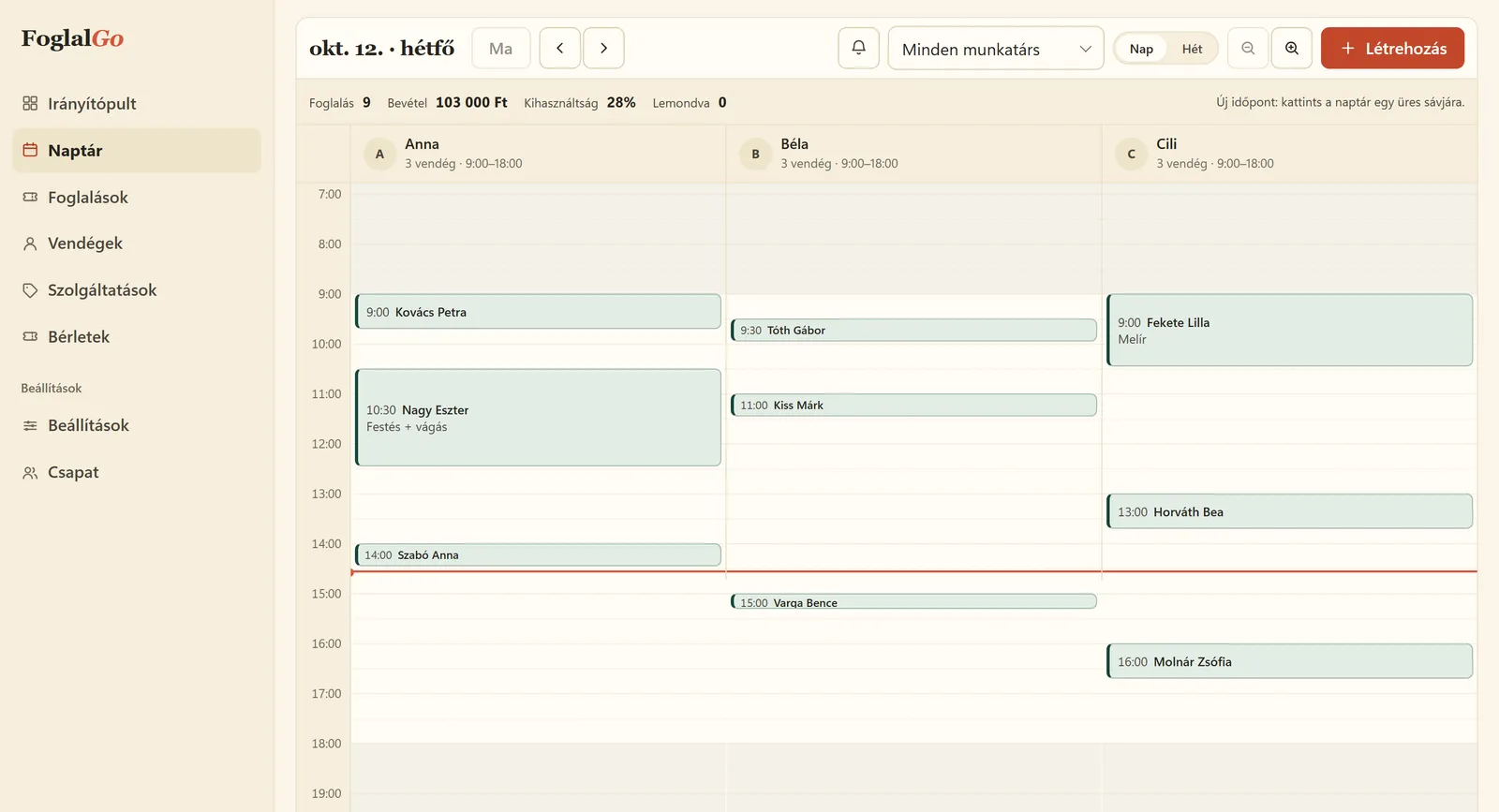
Hair salon: what FoglalGo takes care of
Long and short services side by side
Colouring takes two hours, a men’s cut thirty minutes. The system books each with its own length, and the next client can only get a slot after it.
A schedule for each stylist
Every colleague gets a separate column and their own working hours. Clients can choose a stylist or leave it to whoever is free.
Cut and colour in one booking
Clients can request several services at once; the duration and the price add up.
What your service list could look like
An example setup. You set the names, durations and prices yourself; at registration the system adds a starter list that fits your trade.
The pricing page shows which plan your list fits into. If you use another system now, our comparison pages compare the fees with dates and sources.
| Service | Duration / note |
|---|---|
| Women’s haircut | 45 min |
| Colour + cut | 120 min |
| Highlights | 90 min |
| Men’s haircut | 30 min |
| Children’s haircut | 20 min |
| Blow-dry, styling | 30 min |
How does online booking work in a hair salon?
The salon adds its services with their real durations: a women’s cut takes 45 minutes, colour with a cut two hours, a men’s cut half an hour. Then it sets which stylist works when. On the booking link, clients choose the service and, if they want, the stylist too, and they only see the times that are actually free according to the schedule and the existing bookings.
After booking, the client immediately gets an email with the time and a cancellation link, and the salon sees the new booking in the dashboard calendar. Appointments arranged by phone or in person go into the same calendar, so an online client cannot book the same slot. Long colouring and short cuts do not run into each other, and you do not have to piece tomorrow together from Messenger messages in the evening.
How much does a booking system cost for a hair salon?
With FoglalGo the fee depends on the plan, not on the number of bookings. The Start plan costs HUF 0, with no time limit: 1 team member, 3 services and 30 bookings a month. That may be enough for a stylist who is just starting out and works alone to try it.
A working salon usually has more than three services on its list, so most salons need the Pro plan: HUF 3,990 a month or HUF 39,900 a year, with up to 3 team members, unlimited services and bookings, and reminder emails. With more than three stylists, the Business plan costs HUF 5,990 a month, with unlimited team members. The fees are final prices with no VAT added, and none of the plans charges a booking commission. There is no SMS cost either, because the system notifies by email.
How should you set up colouring so the day does not slip?
With colouring, most delays come from the booking showing a shorter time than the work actually takes. So do not add colouring as a single “Colouring” item, but in its common variants: colouring for short hair, colouring for long hair, colour with a cut. Give each its real duration, including drying.
If you need time for cleaning or preparation between two clients, you can set it as a separate break for each service, so you do not have to hide it in the service length. A client can request several services in one booking, for example a cut and colouring; the system then adds up the duration and the price. If you only take on a job after a personal consultation, for example a complete colour change, it is enough to offer the consultation on the online booking page and add the long appointment from the dashboard.
How do clients find the salon’s booking page?
Put the booking link where your clients already look: in the Website field of your Instagram profile, on the button of your Facebook page and in your Google Business Profile, as the booking link. Print the QR code and put it on the mirror or the counter, so clients book their next cut while paying.
If you have a website, the booking page can be embedded under your price list, so clients book where they look at the prices. You keep adding appointments arranged by phone in the dashboard, so every booking is in one calendar.
Last updated:
Getting started in three steps
Sign up
Enter the name of your business and choose your trade.
Set it up
Opening hours, services, team members or resources, cancellation deadline, and finally you approve your data controller details.
Share it
A link, a QR code or an embedded widget on your website.
Questions from hair salons
How many services can I add?
Three in the Start plan, unlimited in the Pro and Business plans. If you want to make colouring, highlights or blow-drying bookable alongside women’s, men’s and children’s cuts, that is already more than three services, and the Pro plan is the right fit.
Do I need to download a program or an app?
No. FoglalGo is a booking program that runs in the browser: you open the dashboard on a computer, tablet or phone without installing anything. Your clients do not need an app either; they book on your booking link.
Can clients choose their stylist?
Yes. If you have several team members, clients can choose who they want to go to, or ask for anyone.
What if a client does not show up?
The confirmation email contains a cancellation link, and from the Pro plan a reminder email goes out too. You set the cancellation deadline.
Can I bring over my existing clients?
The client profiles are built from the bookings: when a client books, or you add an appointment for them, their details are added to the list. Bulk import is not available at the moment.
Can clients see when each stylist is free?
Clients see the free times for the selected service. If they also choose a stylist, they only get that stylist’s free slots.
Further reading
Starting a hair salon business in Hungary in 2026: qualifications, tax, first clients
The steps in order: qualifications, registering with the tax authority, tax regime, premises, prices and the first clients.
Read it →Adding a booking system to your website: link, button or widget
Three ways to put your booking page online, with WordPress, Wix and Instagram examples.
Read it →Other industries
Launch your booking page
Start plan: HUF 0, no time limit. Sign up without a bank card; after five questions your booking link is ready.