
For salons, studios and service providers
Online booking system. Your clients book on their own.
An online booking system is a web calendar in which clients choose a free time themselves, and the booking goes straight into the business’s calendar. FoglalGo is such a system for salons, studios and service providers in Hungary. Clients pick a time on your own link or on your website, and you see the whole day in one calendar. There is no booking commission.
You can use it as a booking program and as an app: it runs in the browser on a computer, tablet and phone, with nothing to download. Once the planned client payment feature is activated, the money will arrive through your own payment contract, not through us.
- Start: HUF 0, no time limit
- No booking commission
- Dashboard and booking page in English
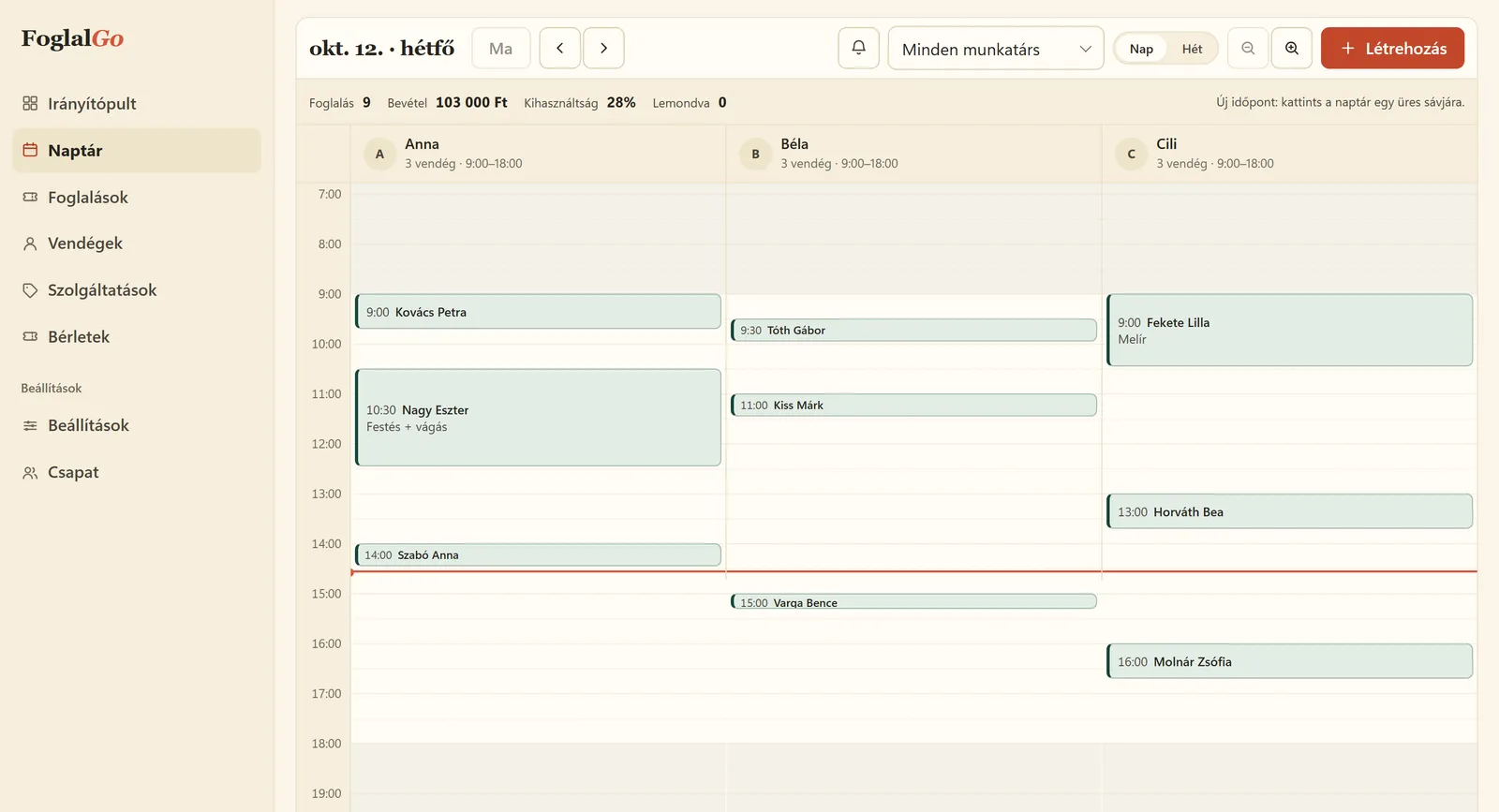
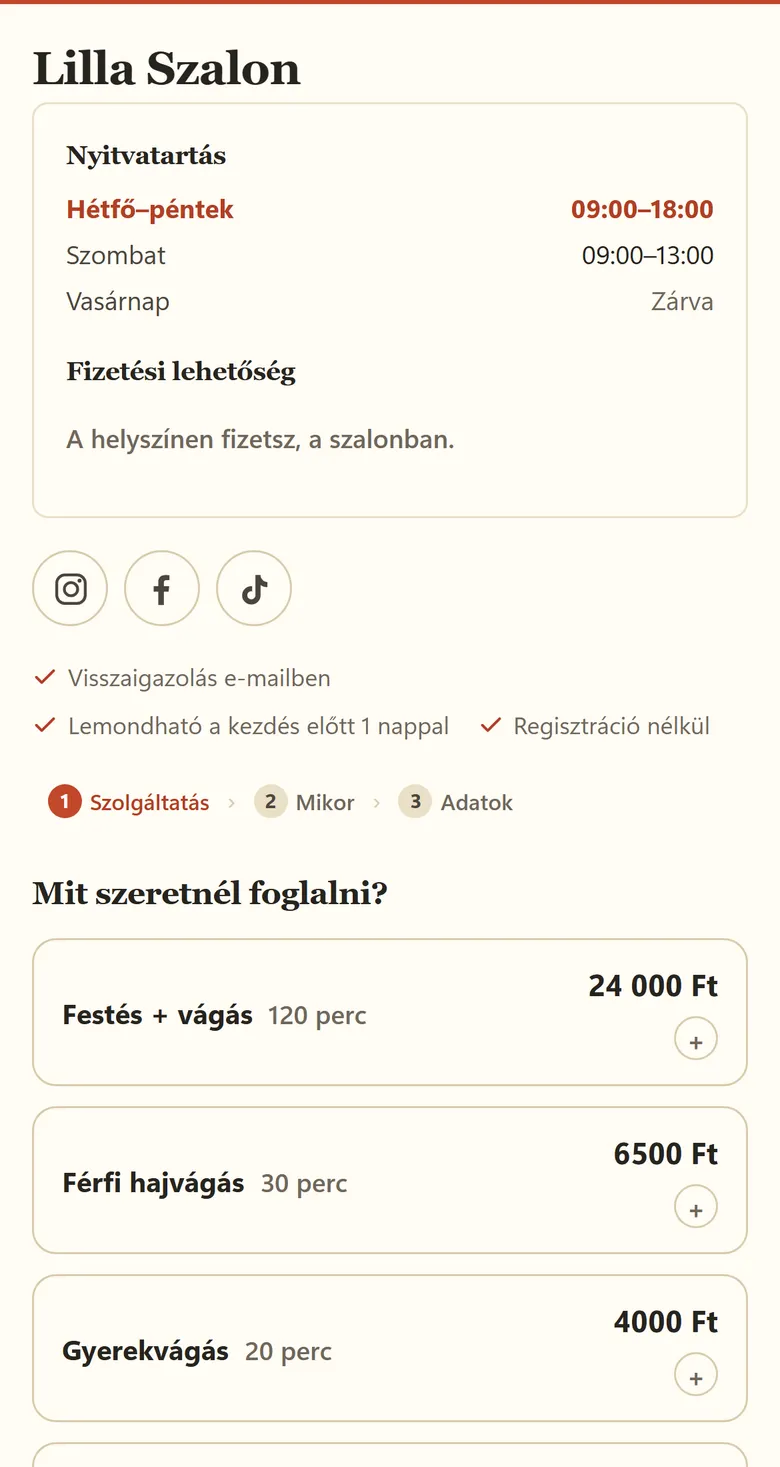
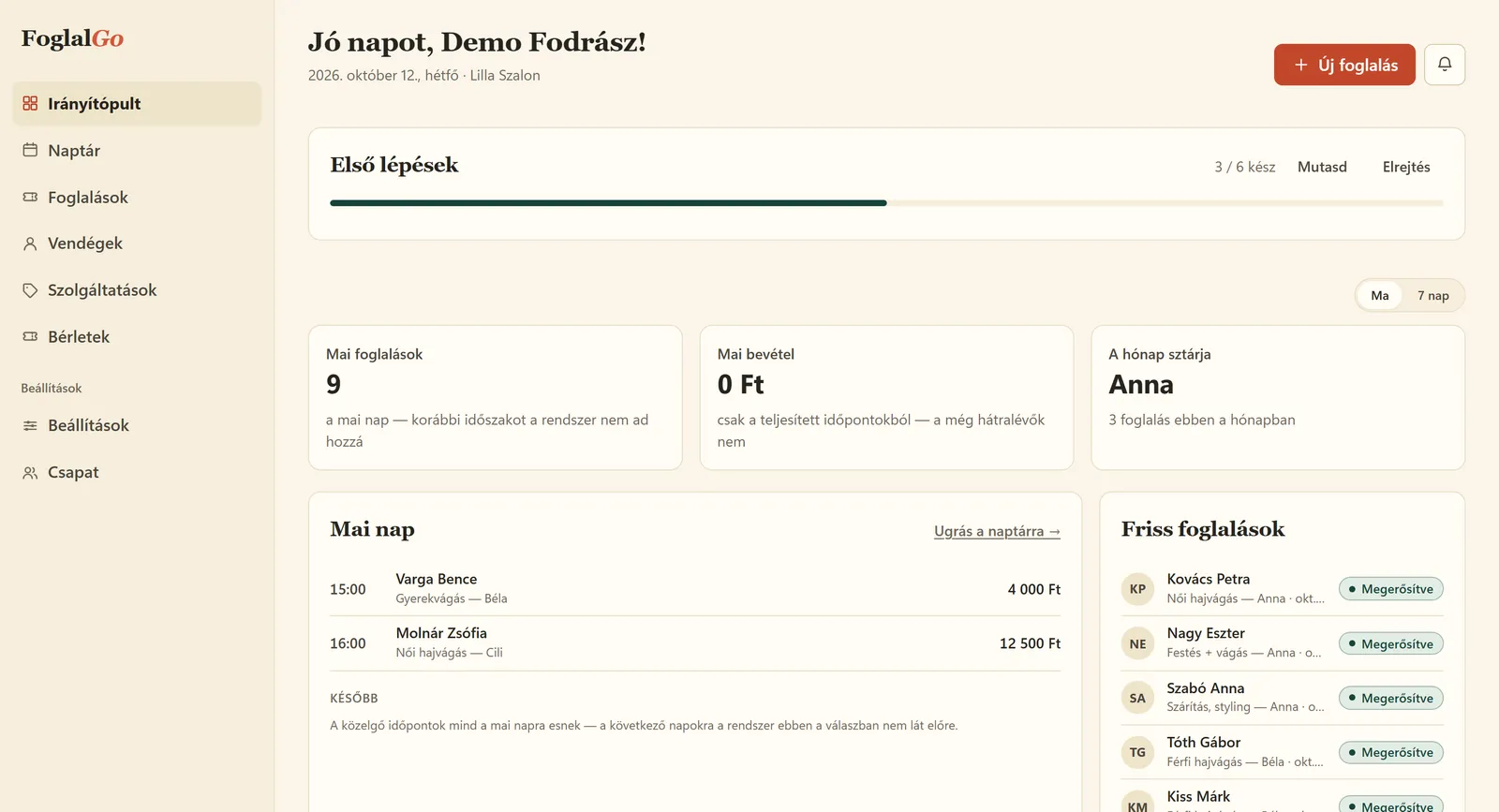
The screenshots show the real interface in Hungarian, with made-up demo data.
What is an online booking system?
An online booking system is a web calendar in which clients pick a free slot from a business’s services themselves, and the booking goes straight into the business’s calendar. Instead of phone calls and message threads, clients can book at any time of day. The system shows only the slots that are really free, based on opening hours, team members’ schedules and existing bookings. Both sides get an email about the booking, and the client cancels with the link in that email. Appointments agreed by phone are added by hand to the same calendar, so two clients can never get the same slot.
How is FoglalGo different?
FoglalGo is a Hungarian booking system that runs in the browser, built for salons, studios and service providers. It has a fixed fee: the Start plan is HUF 0 with no time limit, Pro is HUF 3,990 a month and Business HUF 5,990 a month, and no plan takes a commission per booking. Clients book on your own booking link, with the QR code or through the widget on your website, without registering. The dashboard and the booking page work in English and Hungarian, and the active booking database is bound to an EU data location. It does not send SMS and has no Google Calendar sync at the moment; the features page says so too.
Key terms
- Booking link
- A permanent web address (foglalgo.com/f/…) where clients book. You can add it to your Instagram profile, your Google Business Profile or your email signature.
- Booking widget
- The booking page embedded on your own website, added with a single line of code to WordPress, Wix or a custom-built site.
- Resource
- Anything that takes only one booking at a time: a team member, a treatment bed, a room or a court. Each one is a separate column in the calendar.
- Booking commission
- A fee deducted per booking or per new client, charged by some marketplaces. FoglalGo does not charge one.
Four things you no longer have to do yourself
Phone calls, back-and-forth messages, reminders, a paper diary. FoglalGo hands these over to your clients and the computer.
Clients book on their own
Your own link and QR code, or one line of code on your website. The booking page can be matched to your colours, and booked times disappear from the offer immediately.
One calendar, no double bookings
A time taken over the phone goes into the same calendar as online bookings. Two clients cannot get the same slot.
The emails send themselves
When a booking is made, a confirmation goes to the client and a notification to you. Every email contains the cancellation link, so cancellations do not ring on your phone either.
Money flows straight to you coming soon
The planned client payments connect to the business’s own merchant contract. The specific payment provider and the terms are to be finalised before activation.
A feature marked “planned” or “coming soon” is not currently available and is not part of the service ordered with the subscription. Listing it does not imply a specific availability date. FoglalGo does not ask for or store card details; these are handled exclusively by the payment provider.
- Zero commissionApart from the monthly fee, nothing is deducted from your bookings.
- Active database bound to an EU data locationThe details of the data flows are in the data processing agreement.
- Your data is yoursYour bookings and your client list can be downloaded as CSV.
What it looks like in use
A Monday on the dashboard
A column for each team member
In the day view, every team member, treatment bed or court gets its own column. Times outside opening hours are grey; with one click you add a phone booking or block a period.
- Day and week view, also filtered by team member
- The day’s bookings, revenue and utilisation in the header
- Blocked time for lunch breaks and holidays
Clients book in three steps
Service, time, details. They do not need to register, and at the end they receive the confirmation and the cancellation link by email.
- Prices and durations are visible up front
- Only genuinely free times are shown
- A phone number is only required if you set it that way
A glance at the dashboard every morning
Today’s bookings, expected revenue, the team member with the most bookings this month. On your clients’ profiles you can see who visited when and what they asked for.
From hair salons to padel courts
The system is built on services, durations and resources. A resource can be a person, a treatment bed, a room or a court, so it works for a haircut just as well as for a court rental.
Hair salon
Women’s, men’s and children’s cuts, colouring
Take a look →Barber shop
Haircuts, beards, alongside walk-ins
Take a look →Beauty salon
Facials, lashes, waxing
Take a look →Nail salon
Infills, new sets, pedicures
Take a look →Massage
A separate calendar for each treatment bed
Take a look →Personal trainer, yoga, pilates
One-to-one and group classes
Take a look →Court and room rental
Padel, tennis, rooms by the hour
Take a look →Tattoo and piercing
Consultations and long sessions
Take a look →Dog grooming
Bathing, clipping, trimming
Take a look →How to get started
Five questions at registration, and your own booking page is ready, with no bank card. If you would rather leave the setup to me, you can write below.
-
Step 1
You sign up
You enter your business name and your trade. The system fills the account with starter services, which you can rewrite.
-
Step 2
You set it up
Opening hours, services with prices and durations, team members, the cancellation deadline and your own colours. Finally you approve your data controller details; from then on it accepts bookings.
-
Step 3
You share it
You put out the link and the QR code, or embed the booking page on your website. From then on, your clients book on their own.
How much work is it to get started? Registration is five questions, and the Start plan needs no bank card. The account then starts with starter services, which you change to your own prices and durations in the dashboard settings, where you also set your opening hours and team members. The page accepts bookings once you have filled in and approved your data controller details, because your business is the controller of your clients’ data and FoglalGo acts as a processor. From then on, your booking link and QR code are ready to use.
Fixed monthly fee — never a commission
Start: HUF 0, no time limit. The paid plans have a fixed monthly or annual fee, regardless of the number of bookings. The usage limits are set out in the Fee Schedule (English translation; the Hungarian text is binding).
Start
For a one-person business introducing online booking for the first time.
HUF 0 / month
HUF 0, no time limit.
- Booking widget, own link and QR code
- Confirmation email with cancellation link
- Client profiles and reports
- 1 team member, 3 services, 30 bookings a month
Pro
For a small team where it matters that reminders go out on their own.
HUF 3,990 / month
Or HUF 39,900 / year: ten monthly fees, two months free.
- Everything in the Start plan
- Reminder and status emails
- Group bookings and booking rules
- 3 team members, unlimited services and bookings
Business
For salons and studios with several team members, where there is no stopping.
HUF 5,990 / month
Or HUF 59,900 / year: ten monthly fees, two months free.
- Everything in the Pro plan
- Unlimited team members and resources
- Priority support among cases of equal weight
The fees are final prices with no VAT added, as the operator is exempt from VAT. The annual subscription is ten monthly fees. Support is handled on working days; we do not commit to specific response or resolution times or to a numerical availability. This does not affect statutory deadlines. The binding list is in the Fee Schedule of the Terms of Service (in Hungarian; English translation).
How much does an online booking system cost? The monthly fee is only one item. The real monthly cost often comes from what sits outside it: a fee per team member, a price per SMS, the transaction fee of card payments, a commission on clients sent by a marketplace, and, with net prices, the 27% Hungarian VAT, which a VAT-exempt sole trader cannot reclaim. FoglalGo’s fee is a final price with no VAT added, with no booking commission, and the Start plan is HUF 0. We have collected the alternatives’ prices, checked on a stated date, on the comparison pages.
Just want to try it? The free booking system page explains what fits into the HUF 0 Start plan.
Write to me, and I will set it up for you
A few sentences about your business are enough, and I will show you how it would look for you. I will not call you, and I will not send you newsletters.
- You can also write directly: info@foglalgo.com
- I reply to new enquiries on working days, in English or Hungarian.
- Already a customer? Log in to the dashboard
Request a setup
Two fields are required. The rest is there so that my first reply can already be specific.
Frequently asked questions
More questions and answers on the FAQ page.
Is the Start plan really free?
Yes. The Start plan costs HUF 0, with no time limit. Its limits: 1 team member, 3 services and 30 bookings a month. If you outgrow it, you can switch to the Pro or Business plan.
Do I need my own website?
No. Every account gets its own booking link and QR code, which you can add to your Instagram profile, your Google Business Profile or the salon door. If you have a website, the booking page can be embedded with a single line of code.
Does the system send text messages (SMS)?
No, FoglalGo sends emails. The confirmation email is included in every plan, with a cancellation link. Reminder and status emails are available from the Pro plan.
Can it be connected to Google Calendar?
There is no Google Calendar sync at the moment. Bookings taken by phone and those arriving online go into the same FoglalGo calendar, so the system rules out double bookings on its own.
Is there a commission per booking?
No. The fee is a fixed monthly or annual amount, however many bookings you get within the limits of your plan.
Where is the data stored?
The active booking database is bound to an EU data location. You are the controller of your clients’ data, and FoglalGo acts as a processor. The related service providers and data transfers are listed in the data processing agreement and the list of service providers (English translations; the Hungarian texts are binding).
Can I get started on my own, or do I have to wait for you?
On your own. With the “Start free” button you answer five questions, and your booking page is created straight away; we send the login link by email. It accepts bookings once you have filled in and approved your data controller details in the dashboard. If you would rather I set it up for you, write to me and I will do it.
Can I record phone bookings too?
Yes. A booking you add by hand goes into the same calendar as the client’s own, so there can be no clash. Once the planned client payment feature is activated, you will also be able to send a payment link with it.
What happens to my data if I cancel?
In the dashboard you can download your bookings and your client list before closing the account, and also during the 30-day grace period after closing.
How much does online card payment cost?
For the planned client payments, FoglalGo charges no separate fee or commission. After activation, the transaction fee is set by the payment provider you choose, under your own contract with them.
Do I need to download a program or an app?
No. FoglalGo is a booking program that runs in the browser: you open the dashboard on a computer, tablet or phone without installing anything. Your clients do not need an app either; they book on your booking link.
Is FoglalGo available in English?
Yes. The dashboard and the client booking page can be switched to English, and you choose whether client emails go out in Hungarian or English, even client by client. The binding contract documents (Terms of Service, privacy notice) are in Hungarian; English translations are available for information.
Last updated:
Launch your own booking page
Start plan: HUF 0, no time limit. Sign up without a bank card; after five questions your booking link is ready.