
Tattoo and piercing
Booking system for tattoo artists and piercing studios
The consultation is short, the session long. They are different services in the system, so clients book what they actually need.
- Start: HUF 0, no time limit
- No booking commission
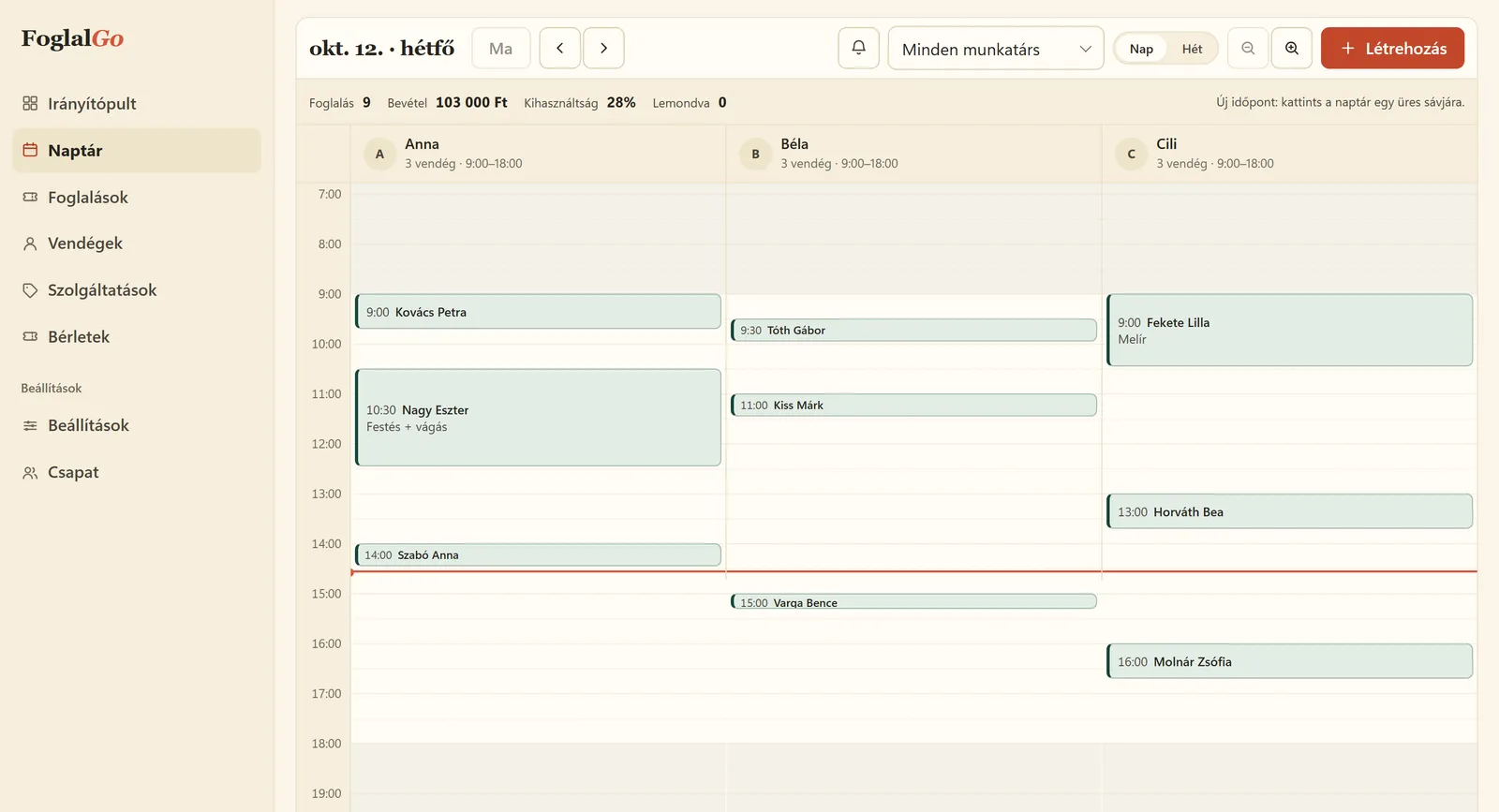
Tattoo and piercing: what FoglalGo takes care of
Consultation and session separately
The first meeting takes 30 minutes, a big piece can take a whole afternoon. In the calendar each appears with its real length.
A calendar for each artist
Every tattoo artist gets a separate column and working hours, and clients can choose who they go to.
Organised client details
On the client profile you see the previous sessions and can add notes about the client.
What your service list could look like
An example setup. You set the names, durations and prices yourself; at registration the system adds a starter list that fits your trade.
The pricing page shows which plan your list fits into. If you use another system now, our comparison pages compare the fees with dates and sources.
| Service | Duration / note |
|---|---|
| Consultation | 30 min |
| Small tattoo | 60 min |
| Session, half day | 240 min |
| Piercing | 20 min |
How does online booking work in a tattoo studio?
In a tattoo studio most work starts with a consultation, so the consultation and the session are two separate services. The consultation is short, half an hour, and that is what you offer on the online booking page. On the booking link the client chooses which artist they want to go to and a free time. After booking, they get an email with the details and a cancellation link.
At the consultation you discuss the design, the size and how many sessions are needed. You then add the long sessions from the dashboard, with their real length, even half a day. So every session appears in the calendar with its real time, and a client cannot book a four-hour session online that you have not discussed yet. Piercing is a short, predictable service, and it can be booked directly.
How do you handle long sessions and guest artists?
Session length depends on the work, so it is worth adding a few typical variants, for example a two-hour, a four-hour and a full-day session. From the dashboard you choose the right one, and the calendar books it with the real time. If the workspace needs preparing between two clients, you can set it as a separate break for each service.
A guest artist is a team member in the system just like your own artists: they get their own column and their own schedule, only for the days they work with you. Clients can choose them on the booking page and see only their free times. When the guest artist leaves, you do not give them any more working hours, so no new appointments can be booked with them online. On the client profile you see the previous sessions and your notes too.
Which plan does a tattoo studio need?
For a tattoo artist working alone who offers the consultation, the session and perhaps a third service, the Start plan costs HUF 0, with no time limit: 1 team member, 3 services, 30 bookings a month. Because of the long sessions, the monthly limit is rarely tight.
If several artists work in the studio, or you offer several session variants and piercing too, the Pro plan costs HUF 3,990 a month or HUF 39,900 a year: up to 3 team members, unlimited services and bookings, and a reminder email before the appointment. With more than three artists, guest artists included, the Business plan costs HUF 5,990 a month, with unlimited team members. There is no commission and no VAT on the fees. Deposits cannot be requested online at the moment.
How do you organise the consultation before long sessions?
For a larger piece, the price and the number of sessions are settled at the consultation. So it is enough to offer the consultation online, with a short, fixed duration. The client books it, and you discuss the rest in person.
After the consultation you add the long sessions from the dashboard, with the agreed duration. Online payment is not available in FoglalGo at the moment; you ask for the deposit outside the booking. You note the agreement, the design and the size on the client profile, so you have it in front of you at the next session too.
Last updated:
Getting started in three steps
Sign up
Enter the name of your business and choose your trade.
Set it up
Opening hours, services, team members or resources, cancellation deadline, and finally you approve your data controller details.
Share it
A link, a QR code or an embedded widget on your website.
Questions from tattoo studios
Can I ask for a deposit online?
Online card payment is not available at the moment; it is marked “coming soon” in the Fee Schedule.
Can I hide long sessions from the online booking page?
You set up the services yourself. If you only take on a big piece after a consultation, it is enough to offer the consultation on the online booking page.
Does it work with guest artists?
Yes, you can add a guest artist as a team member with their own schedule.
Can a client upload a design with the booking?
There is no file upload on the booking page. The client brings the design to the consultation or sends it by email, and you note what you agreed on the client profile.
Can clients see when each artist works?
Clients see the free times of the selected artist, according to the schedule. They do not see other clients’ bookings.
Further reading
How to reduce no-shows and last-minute cancellations
Confirmation, reminder, cancellation rule: what to set so that fewer clients miss their appointment.
Read it →Adding a booking system to your website: link, button or widget
Three ways to put your booking page online, with WordPress, Wix and Instagram examples.
Read it →Other industries
Launch your booking page
Start plan: HUF 0, no time limit. Sign up without a bank card; after five questions your booking link is ready.